To get race bibs printed right, send a vector logo, clear color notes and a clean runner data spreadsheet with one row per bib, then check the proof in two passes. Customized Race Bibs builds a free mockup within 24 hours from those files, and revisions stay free until you approve the design and production begins.
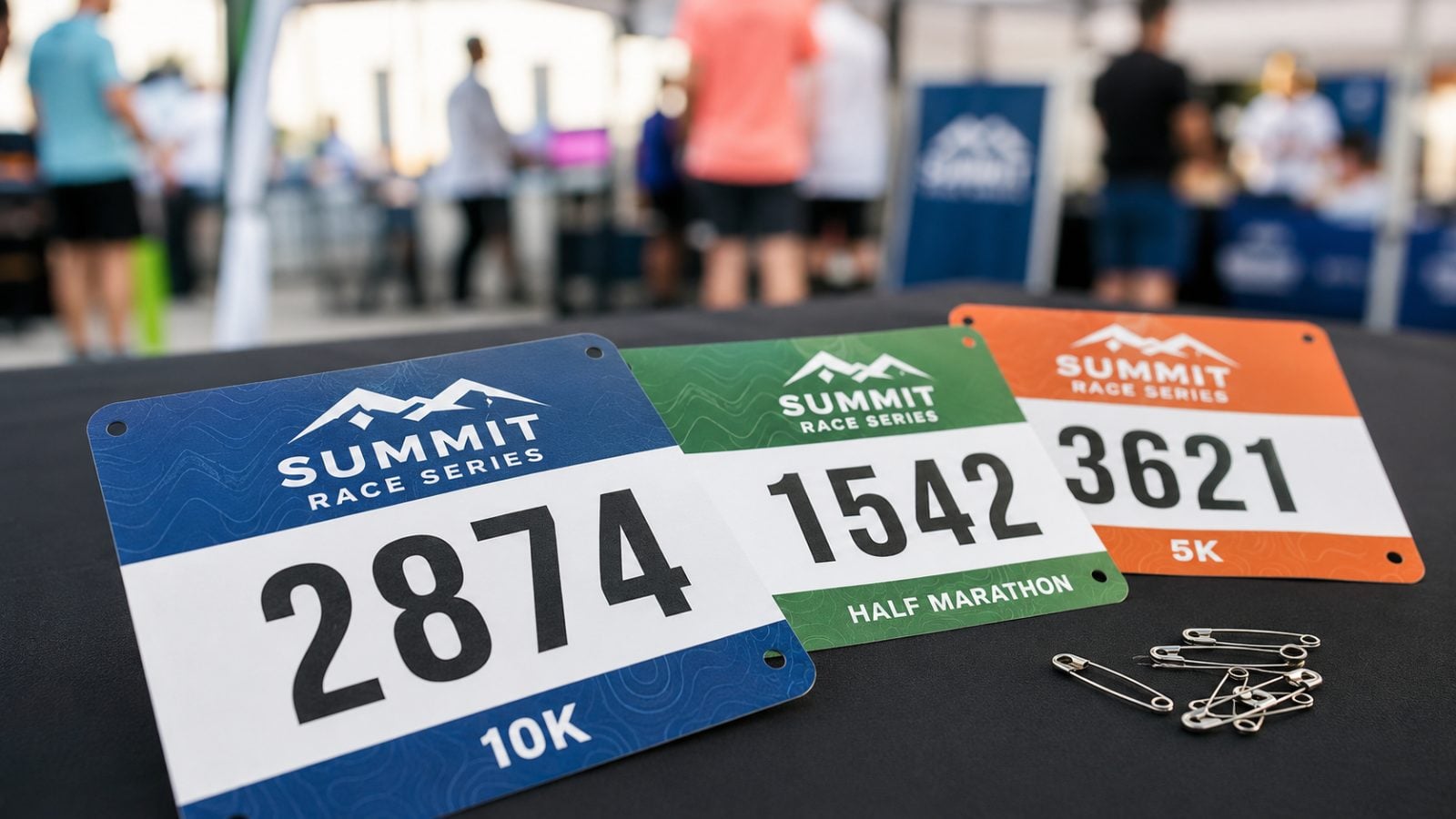
- Vector logo files (AI, EPS, SVG or vector PDF) print sharpest on race bibs.
- Runner data works best as a flat spreadsheet with one row per bib.
- Customized Race Bibs returns a free mockup within 24 hours.
- Revisions are unlimited and free; you pay nothing until you approve.
- Standard turnaround is about 2 weeks after approval.
What artwork package should a race director send for custom race bibs?
For custom race bibs, send three things together: your event logo as a vector file, a short note on colors and sponsor marks, and a clean runner data file if the bibs carry names or assigned numbers. With those three pieces in hand, Customized Race Bibs can build a free mockup within 24 hours instead of trading emails about missing parts.
Race bibs are different from most printed items because two kinds of content share one small surface. The fixed artwork, such as the race name, logo, date and sponsor strip, stays the same on every bib. The variable content, such as the bib number, the runner’s first name or a corral letter, changes from one bib to the next. Each kind needs its own file, and each has its own ways to go wrong.
A complete artwork package usually includes:
- Event logo as a vector file (AI, EPS, SVG or a vector PDF).
- Sponsor logos, each from the sponsor’s own brand kit, also in vector form where possible.
- Color notes: brand colors by name or code, and which distance gets which bib color.
- Runner data as a spreadsheet export, one row per bib.
- Text copy: race name, date, distances and anything printed on the back.
If some of these are not ready yet, send what you have. The mockup can start from the logo and placeholder numbers, and the final data file can follow before approval.
Which logo file formats print cleanly on race bibs?
Vector files print most cleanly on race bibs, because vector artwork stays sharp at any size, from a small sponsor strip to a full-width race name. AI, EPS, SVG and PDF files saved from a design program are the safest choices. A JPG or PNG can work when it is large and crisp, but a small web logo often looks soft or blocky once it is printed.
The easiest test is to zoom in on your logo file. If the edges stay smooth no matter how close you get, the file is vector. If the edges turn into little squares, the file is a raster image and may need to be redrawn or replaced with an original from whoever designed the logo.
| File type | How it prints on race bibs | When to use it |
|---|---|---|
| AI, EPS, SVG, vector PDF | Sharp edges at any size | Event logos, sponsor marks, race name lettering |
| Large PNG with a clear background | Usually fine at modest sizes | When no vector file exists yet |
| Small JPG or a screenshot | Soft edges, visible blocks | Avoid; ask the logo owner for an original |
| Word or PowerPoint file | Logo is often compressed | Only as a layout sketch, not final art |
Fonts are another quiet trap. If your race name uses a special typeface, convert the text to outlines or include the font name in your note, so the lettering on the bib matches your event branding.
How should a runner data file be set up for numbered and named race bibs?
A runner data file for race bibs should be a simple spreadsheet with one row per bib and one column per printed field: bib number, first name, distance and any corral or wave letter. Keep it flat, with no merged cells, colors or notes inside the data. Customized Race Bibs prints exactly what the file says, so the file is effectively part of your artwork.
Most registration platforms export a CSV or Excel file, but those exports carry far more than a bib needs: emails, shirt sizes, emergency contacts and payment fields. Trim the export down to the printed columns before sending it. That protects runner privacy and removes any chance of the wrong column landing on the bib.
Before you send the file, run through these checks:
- Sort by bib number and scan for gaps or repeated numbers.
- Confirm each distance has its own number range and that the ranges do not overlap.
- Decide whether numbers should keep leading zeros, and format that column as text so the spreadsheet does not strip them.
- Check names for stray spaces, all-caps entries and nicknames runners typed in as jokes.
- Look for accented letters and apostrophes, and make sure they display correctly in the export.
- Add a column for blank or spare bibs if you want unnamed extras for race-day sign-ups.
One clean file beats several partial ones. If registration is still open, send a sample export early so the layout can be built, then send the final file once registration closes.
How do colors and contrast affect race bib artwork?
Color choices on race bibs matter less for looks and more for reading speed: the bib number must stand out instantly for finish-line volunteers, timers and race photographers. Dark numbers on a light background, or white numbers on a strong dark band, read best. Pale numbers on a busy background are the most common color problem on first proofs.
Brand colors still belong on the bib. Put them in the header, the sponsor strip or a colored band, and keep the number area plain. If your event uses different bib colors for each distance, choose colors that look clearly different from each other, not two shades of blue that volunteers have to squint to tell apart.
A few color notes worth adding to your artwork package:
- Name your brand colors with a code from your style guide if you have one.
- Say which distance or wave gets which background color.
- Flag any sponsor that requires its logo in a specific color or in white only.
- Mention if the race runs at dawn, dusk or indoors, where contrast matters even more.
Screens and printers show color differently, so treat the mockup as a layout and contrast check. If an exact brand match is critical to a sponsor, say so in the quote request, and Customized Race Bibs can talk through how close the printed result will come on the bib material you chose.
What belongs on the front of a race bib, and what can move to the back?
The front of a race bib should carry only what someone needs to read while the runner is moving: the bib number first, then the race name, a short sponsor strip and, if you use them, the runner’s first name and a corral letter. Everything else, such as emergency details, course notes or post-race instructions, reads better on the back.
When the front gets crowded, the number shrinks, and a small number causes trouble for volunteers, timers and photo tagging. A useful rule is to decide the number size first and fit everything else around it. If a sponsor asks for more space, the back of the bib or the tear-off tab is often the better place for that mark.
Back-of-bib content that works well includes an emergency contact field, a medical notes line, a short course or bag-check reminder, and a sponsor message. If you plan to print on the back, include that copy in the artwork package so it appears on the mockup from the start.
Bib style changes the layout too. A tear-tab race bib needs room for the tabs and their numbers, while a timing-chip compatible bib needs the chip area kept clear. Tell Customized Race Bibs which style you are ordering before the mockup is built, so the artwork is placed for the right bib.
How should you check a race bib proof before approving it?
Check a race bib proof in two passes: one for the fixed artwork and one for the variable data. The first pass covers spelling, dates, logos and colors. The second pass covers real numbers and names pulled from your file. Customized Race Bibs offers unlimited free revisions, and you pay nothing until you approve the design, so take the time to look closely.
For the fixed artwork, read the race name, date and distances out loud, letter by letter. Confirm every sponsor logo is the current version and that none was left off. Look at the bib at arm’s length, roughly the distance a volunteer sees it, and ask whether the number jumps out first.
For the variable data, ask to see several sample bibs from different parts of your list:
- The first and last bib number in each distance.
- The longest first name in the file, to confirm it fits.
- A name with an accent or apostrophe.
- A blank spare bib, if you ordered any.
Share the proof with the people who own each piece. Your timing company may want to see the number format, sponsors may want to see their logos, and the race committee should sign off on the date and name. Collect every comment into one reply, so the next revision covers everything at once and the schedule stays on track.
What happens to race bib artwork after approval?
After you approve the race bib artwork, the design goes into production and standard turnaround is about 2 weeks, with faster turnaround available through express shipping. Changes after approval are possible in some cases, but they can affect the schedule, so the cleanest path is to settle every detail on the proof.
Keep a copy of the approved proof and the exact runner data file that went with it. Those two files are your record if a question comes up when the boxes arrive, and they are the fastest starting point for next year’s race. Many annual events reuse the same layout and only change the date, the sponsor strip and the data file.
If late registrations are a concern, plan for them in the artwork rather than after it. A run of blank spare bibs with numbers but no names, or a separate small top-up order, keeps late runners covered without reopening the main design.
When you are ready, send your logo, color notes and a sample data export through the quote form. Customized Race Bibs will return a free mockup within 24 hours, and you can see your race bibs with real numbers and names before anything prints.
Frequently asked questions
Can race bib artwork be built from a logo on our event website?
Race bib artwork can start from a website logo, but web logos are usually small and soft once printed. Customized Race Bibs can use one for a first mockup, then swap in a vector original before final approval. Ask whoever designed your logo for an AI, EPS, SVG or PDF version, which keeps the race name and mark sharp at bib size.
Should race bib names come from the registration export as typed by runners?
Race bib names should come from the registration export, but not untouched. Runners type names in all caps, add nicknames or leave stray spaces, and those entries print exactly as written. Review the name column, decide on a consistent format such as first name in title case, and fix the obvious errors before you send the file for the mockup.
How do leading zeros stay on race bib numbers in a spreadsheet?
Race bib numbers keep their leading zeros when the number column is formatted as text before you export or save the spreadsheet. Spreadsheet programs often strip zeros from columns treated as numbers. If your event uses padded numbers, mention it in your quote note, and Customized Race Bibs will confirm the format on the mockup so you can see it before approval.
Can sponsor logos be added to race bibs after the first mockup?
Sponsor logos can be added to race bibs after the first mockup, because revisions are unlimited and free until you approve the design. The only real limit is space: each new logo makes the strip more crowded. Collect late sponsor files as vectors, send them in one batch, and review the updated mockup at arm's length to keep the number readable.
What happens if a runner's name has an accent or apostrophe on race bibs?
Race bibs can print accented letters and apostrophes, but those characters sometimes break during a spreadsheet export and turn into odd symbols. Open the file and search for any garbled characters before sending it. Ask Customized Race Bibs to include one of those names on the proof, so you can confirm the printed result matches how the runner spells it.
Should the race bib data file include runners who might defer or cancel?
A race bib data file should include every confirmed entry at the moment you send it, even runners who may defer later. Printing a bib for someone who never shows is a smaller problem than missing a runner at packet pickup. If deferrals are common at your event, add a few named-blank spares instead of waiting on every final status.
Can one race bib order use separate artwork for each distance?
One race bib order can use separate artwork for each distance, such as a different color band or header for the half, the full and the five-kilometer race. Send a data file with a distance column so each bib gets the right design. Customized Race Bibs can show every version on the mockup, so the whole set is approved together.
Who should hold the master race bib artwork files after the event?
The race director or committee should hold the master race bib artwork files: the approved proof, the vector logos and the final data file. Store them in a shared folder the next organizer can find. Customized Race Bibs can work from that saved set next year, which makes an annual reorder a matter of updating the date, sponsors and runner list.
Can a race bib mockup show placeholder numbers before registration closes?
A race bib mockup can show placeholder numbers and names while registration is still open, so layout and colors get settled early. Customized Race Bibs builds the free mockup within 24 hours from your logo and a sample export. When registration closes, send the final data file, review the real bibs on an updated proof, and then approve.
Do timing companies need anything from the race bib artwork file?
Timing companies often want to see the race bib number format and the layout before printing, especially when chips attach to the bib. Send them the mockup, and ask whether they need a specific number range, font size or clear area. Passing their notes to Customized Race Bibs before approval avoids a reprint and keeps chip reads reliable on race day.
Is a printed race bib proof different from the on-screen mockup?
A printed race bib can look slightly different from the on-screen mockup, because screens glow and bib material reflects light. Colors may shift a little, while layout, spelling and number placement stay exactly as approved. Use the mockup to check readability and content, and tell Customized Race Bibs early if a sponsor needs a very close color match on the finished bibs.
Get a free mockup for your race bibs
Send your logo or idea and the quantity you have in mind. Customized Race Bibs returns a free mockup within 24 hours, you approve the design before anything is produced, and standard turnaround is about two weeks with faster options available. Get a custom quote.